✍️ UPTET-2026 Handwritten Note Resizer

Resize handwritten declaration to 30KB - 300KB (JPG)

Click to Upload Handwritten Note

Upload clear handwritten declaration image (JPG, JPEG, PNG)
Crop & Adjust
Handwritten Note Preview
.jpg
📋 Document Rules:
  • Upload a clear handwritten declaration written by hand.
  • Supported format: JPG, JPEG, PNG.
  • Final file size should be between 30KB and 300KB.
  • Crop extra background and keep the full note clearly visible.
  • Typed or digitally generated declaration should not be used.
🔥 UPTET 2026 Correction Form Start / Date Extended – यहाँ देखें
🔥 UPTET form fill karne se pehle pura guide padhe: 👉 UPTET Correction Form 2026
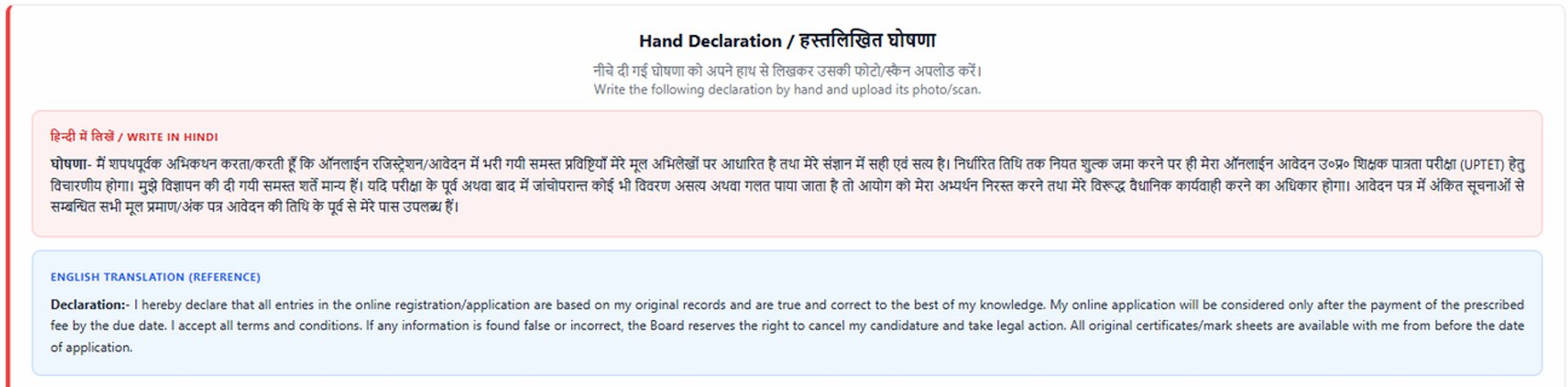
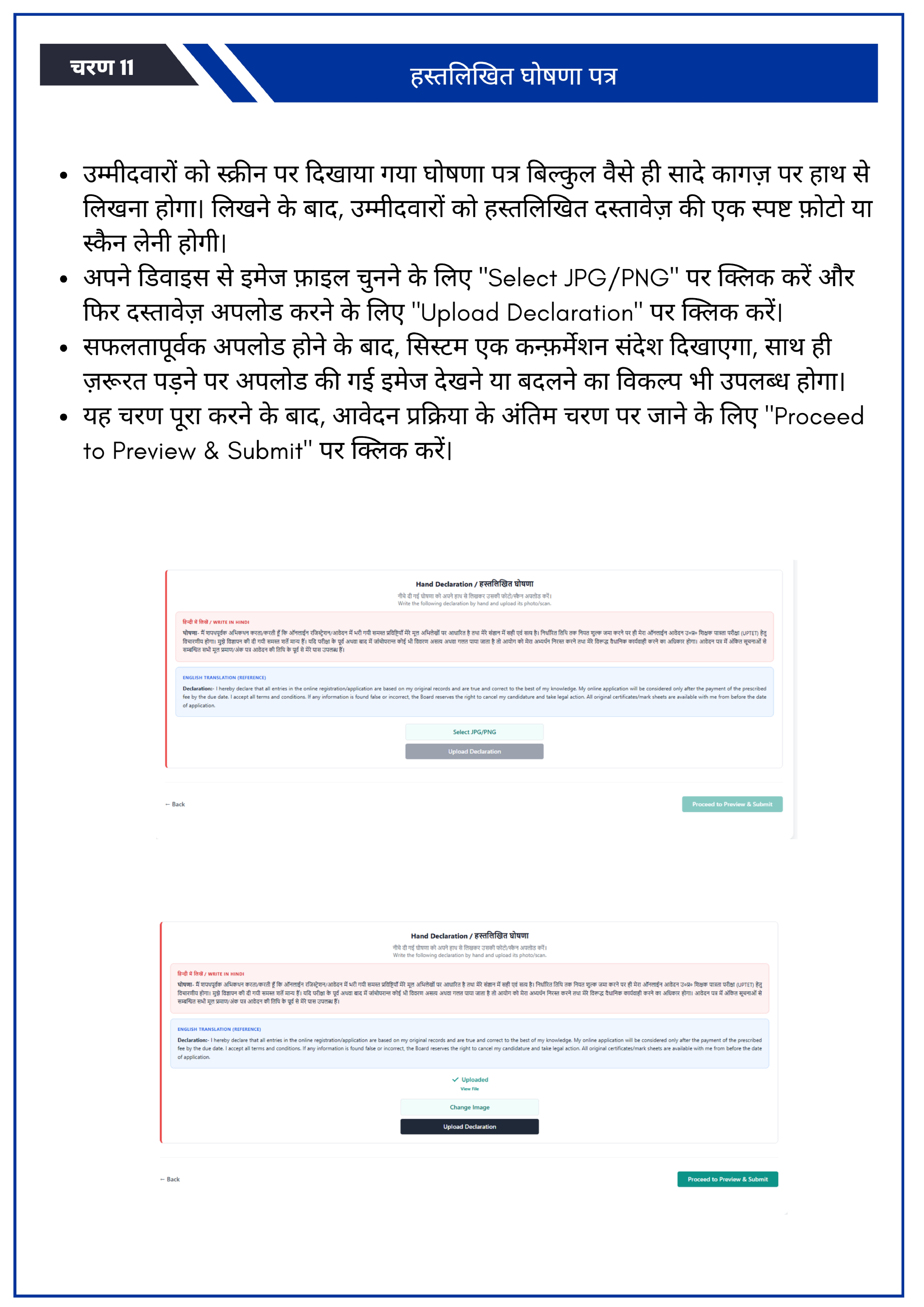
UPTET 2026 Hand Declaration / हस्तलिखित घोषणा
Neeche di gayi declaration ko apne haath se likhkar uski photo/scan upload karein. Image par click karke bada preview dekhein.
UPTET 2026 handwritten declaration sample Download Declration
UPTET 2026 Handwritten Declaration
Khud apne haath se declaration likhein, uski clear photo click karein, phir wahi image upload karein.
Follow these steps:
  1. Declaration ko khud apne haath se safed kagaz par likho.
  2. Blue ya black pen ka use karo aur pura text clearly likho.
  3. Kagaz ki clear aur seedhi photo click karo ya scan karo.
  4. Image mein sirf declaration dikhni chahiye, extra background crop kar do.
  5. Ab isi tool mein wahi image upload karo aur required size mein download karo.
UPTET 2026 full handwritten declaration sample Save to Device
🙏 धन्यवाद Champ!

आपकी वजह से यह टूल Google, Yahoo और Bing पर Rank #1 कर रहा है 🚀। 1700+ छात्रों ने इस टूल का इस्तेमाल किया है और 14K+ बार इसका सफलतापूर्वक उपयोग हुआ है 💯।

📢 20 मई से शुरू हो रही है Daily Free Test Series (सिर्फ 20 मिनट) 📚 — जिससे आपकी तैयारी और मजबूत होगी।

💡 हमारा साथ सिर्फ form fill करने तक नहीं है, हमेशा रहेगा 🤝। ⚠️ Form गलत नहीं भरना है! अगर आपको किसी भी प्रकार का doubt हो — चाहे छोटा हो या बड़ा — बिना सोचे हमें mail करें:

📩 support@examoresizer.com — हमारा goal है कि आपका form एकदम सही भरे 💯।

👉 तैयारी के लिए हमारे YouTube चैनल से जुड़ें:

📺✨ Subscribe ExamO Cafe

👉 धन्यवाद Buddy 😎💐

🔗 Useful UPTET Tools

UPTET Handwritten Declaration Tool

Handwritten declaration UPTET form ka important part hai.

Resize and prepare declaration easily.

UPTET form ke liye documents kaise prepare kare?

Aap photo, signature aur PDF documents ko required size mein prepare karke upload kar sakte hain.

📌 Important Instructions:

Browser-Side Privacy

We use Client-Side Processing. Your handwritten note never leaves your device. It is processed directly in your browser. We do not upload or store your data on our server.

⚠️ Important Disclaimer & Privacy Policy
  • No Data Storage: We do not upload, store, or view your handwritten notes on our servers.
  • User Responsibility: Final image upload se pehle size aur clarity zarur check karein.
  • Non-Affiliation: This tool is not officially affiliated with UPESSC.
  • Privacy & Data Usage: Processing browser mein hoti hai, server par kuch store nahi hota.
  • Advertising Disclosure: This website is supported by ads to keep this tool free.
✅ Important Message for Students

English: Before submitting your UPTET 2026 application form, please carefully read the official guidelines. This tool is created only to help you format your handwritten declaration properly. If you have any confusion, contact us at support@examoresizer.com.
Best of Luck for UPTET 2026!


हिंदी: UPTET 2026 का फॉर्म भरने से पहले कृपया आधिकारिक निर्देश अवश्य पढ़ लें। यह टूल केवल आपकी सहायता के लिए बनाया गया है। किसी भी समस्या पर आप हमें support@examoresizer.com पर संपर्क कर सकते हैं।
UPTET 2026 के लिए शुभकामनाएँ!

📌 UPTET 2026 form bharne se pehle check kare: UPTET Online Form 2026 – Apply Online, Last Date, Notification
📅
UPTET Form: 27 Mar View Tools
🌟
Share ExamO!
  • UPTET Online Form 2026